
Read the three time labels together
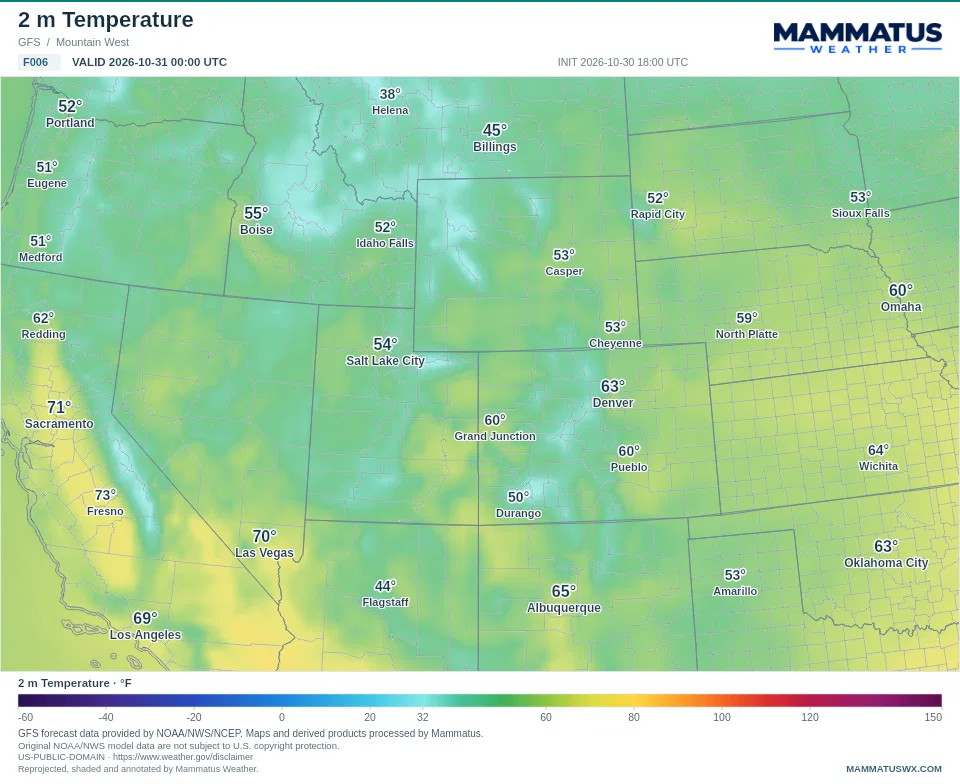
The example graphic below comes from the GFS run initialized at 18:00 UTC on October 30, 2026. Its F006 label means six forecast hours after initialization, so its valid time is 00:00 UTC on October 31. F000 is the model field at initialization; it is not a live station observation.
Mammatus keeps UTC on exported graphics so the timestamps travel with the image. The viewer also displays local time using your browser’s time zone. In this example, 00:00 UTC on October 31 is 6:00 PM MDT on October 30 in Denver. Check both the date and the time when a forecast crosses midnight.
Match the parameter to its legend
The example is 2 m temperature in degrees Fahrenheit. Its city readings describe the same field as the shading. Changing to an upper-air temperature, wind, or precipitation parameter changes what the colors mean; a familiar color does not carry a fixed meaning between products.
Temperature and other continuous fields are interpolated for smooth shading. That makes the map easier to read, but it does not create new model resolution. A small valley, ridge, or thunderstorm can be narrower than the source grid. City values use the native grid cell near the named location rather than a new measurement at a weather station.
Understand the unshaded parts of a map
An unshaded area can mean that a model does not cover that location, a value is missing, or the source specifies transparency. For example, a visibility product can deliberately leave good visibility clear. Clear shading should not automatically be read as a numerical zero.
Pressure-level maps need another check in the mountains. The 850 hPa surface can lie below the ground over high terrain. Some source products mask those areas. Mammatus preserves that mask; smoothing across it would invent a forecast value. Check the parameter note and use surface temperature when you want conditions near the ground.
Use city labels as reference points
City names stay anchored during playback. Numeric values appear above them for supported scalar fields. Simulated radar and precipitation-type graphics use city names without extra dBZ or category numbers, so labels do not compete with the weather pattern.
County and state boundaries help locate features, but they do not change a model’s resolution. A sharp color boundary crossing a county is a model feature, not a statement that weather will stop at that county line.
A practical viewing sequence
- Choose a region. The model list follows the published coverage, including the separate Alaska and Hawaii views.
- Choose the parameter and confirm its units, valid time, and forecast hour.
- Let the selected parameter preload. Green progress means the graphics have rendered and decoded for playback.
- Step through the forecast with the arrow keys. Compare another model at the same valid time before drawing conclusions from one frame.
- When sharing a graphic, keep its complete header, legend, and source credits.
PNG and JPG exports reuse the loaded graphic at the current viewing resolution. GIF and MP4 exports use the selected forecast sequence. A simulated reflectivity forecast is still model guidance; consult current radar and official warnings for developing storms.
Sources & corrections
This guide explains the Mammatus website’s behavior and uses the original product definitions below. The publisher is Mammatus Weather; it is not an agency forecast or an endorsement by a data provider.
- Mammatus model data and rendering methods ↗
- National Weather Service: weather models ↗
- NOAA: pressure levels and elevation ↗
Found an error? Send a correction with the page link and the detail that needs checking. Read our sources and methods.